

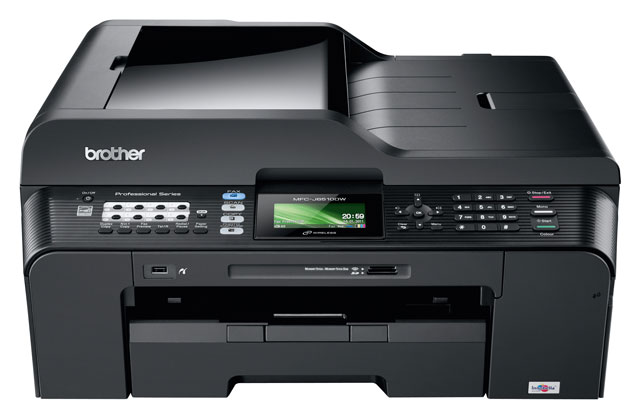
There are three striking things about Brother’s awkwardly named MFC-J6510DW A3 printer.
Firstly, because it prints, scans and copies in sizes up to A3, it’s big. Secondly, at less than three grand, it’s a whole lot of printer for a small outlay. And thirdly, it’s a good thing people don’t buy printers on account of their names.
Brother’s latest A3 offering is an all-in-one model that can print, copy, scan and even — for those who still require such things — send and receive faxes. It’s an inkjet model that also prints to photo paper, with good results.
The only obvious downside of this jack-of-all-trades approach is that one has to change the entire contents of the 250-sheet paper tray when changing paper sizes as it can’t hold A3 and A4 paper simultaneously. Nor can it hold, say, envelopes and A4 at the same time.
Considering its price, this is a minor gripe. And one can manually feed in paper through the top of the printer, meaning it’s possible to leave it stocked with your most frequently used paper stock and handle the uncommon ones as and when necessary.

A3 prints pop out on top, above the scanning/copying portion, while A4 prints come out beneath it in a dedicated, fold-out plastic tray, which protrudes from the front of the unit. This, too, is less than ideal, but is also not really worth moaning about.
In fact, there’s a great deal to like about Brother’s A3 monster, including the high resolution LCD display in the centre of the control panel and the 35-sheet automatic document feeder on its top.
Like TV remote controls, there are still too many buttons on the unit for our liking, but this is – at least in part – thanks to the facsimile functionality and the inclusion of speed dial, redial preview and other associated buttons.
Users are spoilt for connectivity options, with SD and Memory Stick reader slots along with a USB and PictBridge connection on the front of device. There are also USB and Ethernet ports for tethering directly to the printer or connecting it to a wired network.
Although the unit also supports wireless connectivity over Wi-Fi, we couldn’t get it to work, despite carefully following the manual’s instructions — see, even reviewers sometimes RTFM.
Though most people will probably use the unit for the basic functions for which it’s intended, there’s a great deal of added functionality in the Brother for the office professional. It’s possible to perform “duplex” — or double-sided — printing on formats large and small (though it’s not possible to do duplex copying), and users can print photos directly from flash drives or memory cards using the LCD screen.
The printer can manage a full A3 photo print in less than four minutes, though highest quality will take double that. It prints A4 black-and-white pages of text at about eight pages per minute, or half as quickly if printing double-sided pages. This slows to about four pages per minute when there are lots of images, but that’s hardly sluggish.
The scanner is excellent, producing vivid images up to 1 200dpi resolution at A3, and includes functionality like the ability to detect separate items and save them individually. Users can save to all of the usual formats, from TIF to Jpeg, GIF, PDF, PNG and BMP.
While the device itself is relatively inexpensive at R2 999 (many retailers have it on special for R2 499 this month), its consumables aren’t. It takes four cartridges — black, cyan, magenta and yellow — and, with the black cartridge priced at R399 and each of the other colours costing R299, you’re looking at almost half the price of the machine for a full contingent of replacements.
Brother claims the black cartridge is good for 2 400 pages, while the colour cartridges should survive 1 200 prints.
Considering its target market — those with small businesses looking for a little more flexibility than the standard all-in-one offers and, of course, the ability to handle A3 — Brother’s latest offering is excellent value for money.
If you’re willing to shop around for non-proprietary cartridges — which may void the warranty — it becomes an even better deal. There is another model in the range that offers a second paper tray, but for its price the MFC-J6510DW is tough to beat. — (c) 2012 NewsCentral Media