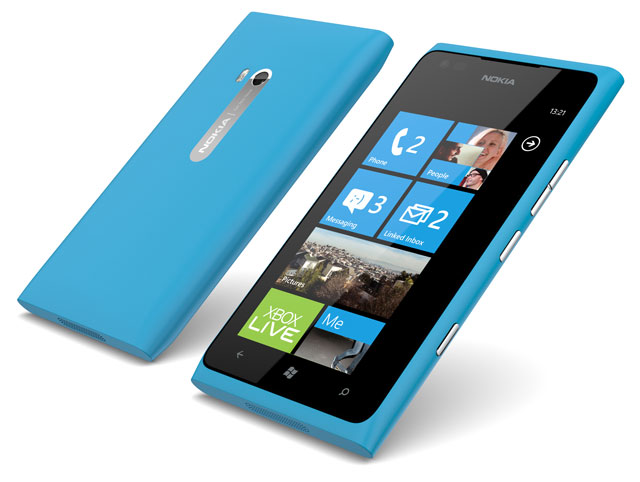
The Lumia 900 is the belle of Nokia’s increasingly poorly attended ball. It has everything a discerning smartphone user could want: great hardware, powered by an excellent operating system, wrapped in a handsome shell. But being at the top is tough. The competition is fierce and, in many ways, despite its pedigree and history, the greatest challenge is that Nokia’s playing the role of newcomer again.
Of course, there’s another, even more difficult obstacle in Nokia’s way. At the recent Windows Phone Developer Summit, Microsoft dropped a bomb on the Finnish company. It announced that current Windows Phone devices won’t be getting an upgrade to the next big update of the software. Windows Phone 7 and 7.5 devices will get upgraded to version 7.8 instead of version 8. Sure, Windows Phone 7.8 will include a number of the elements of version 8, but this essentially stops the current Lumia range in its tracks.
Though the Lumia 900 is a great device, it’s targeting the most savvy consumers in the mobile handset market, those who are least likely to buy a device they know will be outdated before the end of the year. Even Nokia loyalists are likely to wait for the first Windows Phone 8 handsets to hit the market before upgrading.
This is a pity, because the Lumia 900 has a great deal to offer. Of course, by placing all of its high-end smartphone eggs in Microsoft’s basket, this was the risk Nokia took, but it must be incredibly frustrating for the company and its CEO, Stephen “Burning Platform” Elop to have had a product’s appeal and longevity vastly diminished by a partner that was expected to help it eat into the dominant market positions held by Apple’s iOS and Google’s Android.
Upgrade concerns aside, the Lumia 900 is almost as capable a device as any of top-end phones on offer today. It includes a 1,4GHz single-core Scorpion processor, an Adreno 205 graphics-processing unit, 512MB of RAM and 16GB of flash storage. Unfortunately, there’s no microSD slot with which to expand the storage capacity.
This doesn’t quite add up to the quad-core processors or 1GB of RAM found in the latest top-end Android phones from HTC and Samsung — the One X and the Galaxy S3 — but it is respectable and delivers the snappy and fluid user experience expected from top-end devices.
The Lumia 900 also offers an 8-megapixel shooter with Carl Zeiss optics, autofocus, a dual-LED flash and the ability to shoot video at 720p at 30 frames a second. The dedicated two-step camera button makes it possible to access the camera without unlocking the device and to focus via a half-press of the button.
Users can also manually tweak a wide range of settings in the camera, including white balance, ISO value and exposure compensation. There’s also the ability to choose between centre-weighted, spot or matrix metering. The images it produces are excellent, as one would expect from the company that effectively pioneered mobile-phone photography.
The Lumia 900 is also the first handset in the Lumia line-up to offer a front-facing camera. It’s a fairly pedestrian 1-megapixel affair that shoots VGA-quality video at 15 frames a second. Nevertheless, this is sufficient for the occasional video call, but fails to keep up with rivals, which are now including secondary cameras with twice the resolution.

One of the areas where the Lumia 900 doesn’t even pretend to keep up with its peers is the display. The 4,3-inch Corning Gorilla Glass-reinforced Amoled display offers a resolution of only 480x800pixels and a pixel density of around 217 pixels/inch, far less than what’s offered in the One X and Galaxy S3.
Although the display is still excellent — it’s contrast is great and the automatic brightness settings make it a pleasure to use in sunlight — it simply isn’t as crisp as the latest and greatest Android phones. And, despite being almost an inch larger than last year’s iPhone 4S, it offers lower resolution.
The overall styling of the Lumia 900 is pleasant enough. Its clean lines and unadorned face make it look every bit the part of a high-end device. Aside from the three chrome buttons on its right-hand side (volume, power/lock and camera) the only other noticeable features are the three capacitive buttons demarcated beneath the display (back, home and search).
With capable although not outstanding hardware, the real make or break feature of the Lumia 900, and indeed the range as a whole, is Windows Phone 7.5.
The Windows Phone Marketplace has expanded considerably since the first Microsoft-powered handsets were launched and now includes most of the common applications users will want, including WhatsApp, Facebook, Twitter, Skype, Viber, LinkedIn, Shazam, Photosynth, and, yes, even Angry Birds.
It’s an incredibly slick and minimalist interface and one that takes a little getting used to if coming from the icon-based world of iOS or the icon and widget combination of Android. Windows Phone relies on a combination of homepage tiles and more traditional lists of settings and applications.
Although we’d like to see more information on homepage tiles, with only some of them being dynamic and others essentially being nothing more than over-sized icons — a problem Windows Phone 8 looks set to fix going by prelaunch screenshots — the whole experience of using the Lumia 900 is surprisingly intuitive.
One of the pleasant aspects of the interface is the circularity of applications like Twitter. Swipe right through the various headings and once you reach the end of the list, an additional swipe to the right returns you to the beginning of the list.
Another interesting aspect of Windows Phone 7.5 is its lack of an open applications display. The Windows logo-bearing home button always returns you to the home screen, while back will take you to the last application or folder you’ve accessed. You can press back endlessly, which is a little strange at first, but useful once you get used to the idea.
With People Hub, an application that collates updates from various e-mail accounts and social networks, the Lumia 900 offers one of the cleanest and simplest ways to manage a large number of accounts from a single app. This integration also means that, if allowed to, the Lumia 900 will pull in photo albums from Facebook. It also makes posting to social networks seamless.
Windows Phone is a great mobile operating system in its own right. It’s a pity, then, that the Lumia range won’t get the update. But for those who’ve already committed to it, there are other apps, developed by Nokia, that make the Lumias great devices.
Nokia Maps, Nokia Drive and Nokia Music are all outstanding apps unique to Lumia devices. Maps offers turn-by-turn navigation, with Drive offering a pared-down interface designed with drivers in mind. Music, meanwhile, offers the ability to stream mixes of songs tailored to an individual’s taste and allows them to be stored offline.
Nokia’s add-ons are well thought-out and designed, but they’re not compelling enough to make buying a Lumia 900 now a better decision than waiting for Windows Phone 8-powered devices.
There are a few, minor annoyances in Windows Phone 7.5, including the lack of support for unstructured supplementary service data (USSD) — a staple of the SA prepaid market and widely used by mobile banking services.
Then there’s the peculiar search button beneath the display. Rather than offering search functionality based on the app in use, it serves only one purpose: to launch the Bing search page using Internet Explorer. It seems an enormous waste of a button, though those who do a lot of heavy browsing may appreciate it. These problems will hopefully be fixed in Windows Phone 8.
Were the Lumia 900 in line for the upgrade, it would be a far more compelling proposition. But as it stands, it now looks like a curiosity and perhaps a collector’s item. It had so much potential before Microsoft shot its partner in the foot. — (c) 2012 NewsCentral Media
- For now, the Lumia 900 is available only through MTN on a R369/month Anytime 200 contract with 75MB/month of data