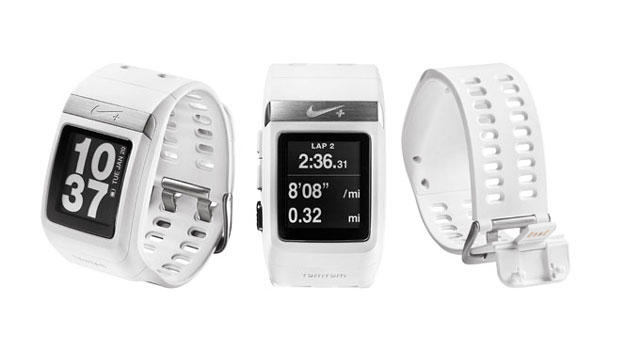
Sports brands have been doing a good job of making personal fitness hip in recent years while at the same time encouraging people to record and broadcast their activity using a range of performance metrics and gadgets.
The Nike+ SportWatch GPS is the perfect embodiment of this trend. Unfortunately, it’s better on the drawing board than it is on the track or road.
Launched in 2011, the Nike+ SportWatch GPS has gone through a number of iterations that have seen new colours introduced and firmware updates that have added functionality like support for Nike’s mysterious metric it calls NikeFuel points, and the ability calculate and display average pace.
Whether it’s because we’ve bought into the hype, or because we’re attempting to keep the ageing process at bay, members of the TechCentral team have been running a great deal in the past year and, like many enthusiastic amateurs, we’ve been using our smartphones to track our outings and analyse our progress over time. It’s little wonder, then, that we leapt at the chance to try Nike’s GPS watch.
With built-in GPS powered by navigation company TomTom, the ability to measure time and distance while calculating both instantaneous and average pace, and an LCD display, the SportWatch is essentially a wrist-sized, massively crippled mobile phone.
Sure, there are plenty of other sports watches on the market that offer the same sorts of features and add others — such as the ability to measure and record your heart rate – but for the budding running enthusiast it’s going to mean replacing a smartphone and accompanying running application.
We’ve been using the Nike+ Running smartphone application for months, and its online interface is the same one that the SmartWatch uses to store and compare information for each outing.
The Web interface is excellent, showing you everything from replays of your recorded runs and the various milestones you’ve reached to tabling your progress over time and showing you how well you measure up against your friends.
Getting the SportWatch’s data into the Nike+ database requires plugging it in to the USB port on a computer and using a piece of proprietary software to scrape the data from the watch.
The same piece of software allows you to adjust settings such as whether the display is black text on a white background or the reverse and to turn off the infuriating default beeping that otherwise accompanies every press of a button. It also allows you to pick which measurement you’d like featured on the watch face while you’re running.
The software and the degree to which the SmartWatch can be customised are underwhelming. Nike could easily have offered half a dozen clock faces or even simply a selection of typefaces for the two line digital display it’s settled on for displaying the time. Instead, there’s just one typeface and just one layout.
Also, it should be possible to change which metric gets prominence on the display without having to tether it to a computer.
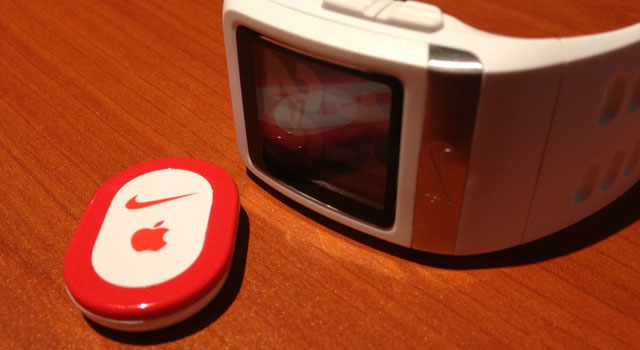
We reviewed the white version of the SmartWatch –arguably the least practical colour for a device you’re likely to wear daily and sweat on.
There’s also the issue of its size and weight. The SportWatch is a centimetre thick and, at 66g, it feels heavy for a wristwatch.
We’d also have liked the device to measure heart rate, either through the wearer’s wrist or using an included sensor. Instead, in order to measure your heart rate you’ll need to invest in a Polar Wearlink+ Heart Rate Transmitter.
Still, Nike does get some credit for including a sensor that can be placed in a shoe for instances where GPS coverage might be poor or when using a treadmill. The sensor is designed to fit in a slot beneath the insole of specific Nike shoes, but we found tucking it in the top of a sock equally effective.
Tapping the SportWatch’s display activates the backlight, and there are three buttons on the left-hand side to toggle between the various display options and settings. The top two allow you to navigate up and down through the menus, while the third, silver button is used for making selections. Holding this button for three seconds will also start or end a run.
Perhaps our biggest gripe about the SportWatch is that the time it takes to secure a GPS signal varies enormously. The first time we used the device, it took more than three minutes to get a GPS lock; the second time took just 10 seconds, and the third attempt took about a minute.
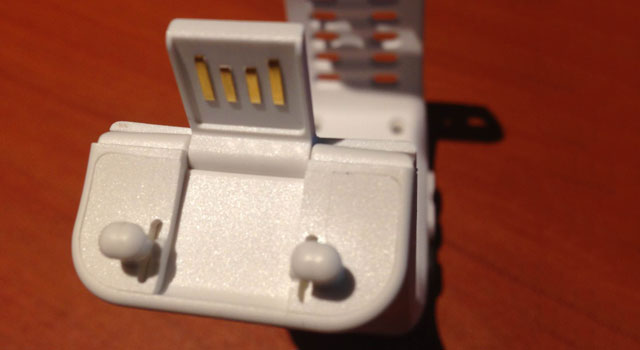
The average person who runs no more than eight hours a week should have to charge the SportWatch only once a week. This is done using the USB connection that forms part of the clip at the end of the wrist strap.
Overall, it’s tough to recommend the SportWatch over a smartphone that has the Nike+ application or an equivalent like RunKeeper, especially as a smartphone also allows you to listen to music and, in our experience, is no less accurate in its measurements.
The only obvious benefit of the SportWatch is that it allows its wearer to see information at a glance, something that’s more difficult with a smartphone in a pocket or armband. Also, Nike says the watch is waterproof, unlike most smartphones.
With a recommended retail price of R1 899, the SportWatch becomes an even more difficult proposition: for the same price, you could buy a capable heart-rate monitor, an armband for a smartphone, and a number of post-run breakfasts.
Nike is to be commended for its efforts with the SmartWatch, but until the company can make the device slimmer, include functionality a phone can’t replicate, and latch onto GPS signal sooner, we’re going to stick to our smartphone apps. — (c) 2013 NewsCentral Media