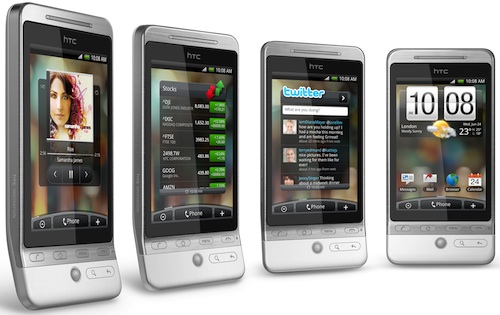
At last! The Apple iPhone has a serious rival. HTC’s Hero touch-screen smartphone is the first device we’ve seen that comes within a whisker of knocking the iPhone off its pedestal. But it still falls just short of being a perfect handset.
Let’s start with the positives — and there are plenty of them. The 135g Hero, which runs Google’s Android operating system, is fast and responsive. The phone, which has a 528MHz Qualcomm processor, takes a long time to boot up, but once it’s running, the software is snappy and a pleasure to use.
The phone has a 3,2-inch capacitive touch screen sporting a resolution of 320×480 pixels. The screen is slightly smaller than the iPhone’s. There are more buttons, though: six, compared to the iPhone’s two. There’s also a small, BlackBerry-style scroll wheel for controlling an on-screen cursor.
The Hero has all the connectivity options you’d expect in a high-end smartphone, including Wi-Fi and high-speed packet access (up to 7,2Mbit/s for downloads and up to 2Mbit/s for uploads). It also has a GPS receiver.
Battery life is reasonable for a device like this. For the most part, we could operate the phone throughout the day — and that included fairly heavy use at times — without the need for a recharge.
What makes this phone really stand out, though, is its software. HTC has really given Android a makeover, creating a user experience that’s on a par with the iPhone’s operating system.
HTC has created seven home screens that you can flick through quickly with your finger. These screens are entirely customisable: you could be running a Twitter client on one screen, for instance, and your e-mail on another.
You can also switch modes depending on the time of the day or week: simply switch to a weekend mode, for instance, and access a different set of widgets and applications. It’s an idea first pioneered by Nokia, but put to good use by HTC.
Because the HTC uses Android, integration with Google services is seamless. We logged into Gmail and Google Talk within seconds. And the Android Market provides access to thousands of additional applications — only free apps are available to SA users for now.
Business users will be pleased to know that the Hero supports Microsoft Exchange servers as well as POP3 and IMAP.
Other nice touches in the Hero include a 5-megapixel camera (there’s no flash), and multi-touch support in the phone’s Web browser.
The only major downside to the Hero is the phone’s “lip” or “chin”. The bottom of the device literally bends outward, making it awkward to shove into a pants pocket.
HTC was obviously keen to design something a little out of the ordinary — perhaps the company was worried it would be accused of simply copying the iPhone’s design. But creating this lip at the base of the phone was a mistake.
Another, less serious downside is the lack of memory. The phone comes with a 2GB microSD card, but we’d have preferred more integrated flash memory. The Hero simply doesn’t compete with the iPhone as a music player. Don’t buy it assuming you can carry your music collection around with you.
Despite this, we think the Hero is the best handset in HTC’s line-up. If you’ve been hankering after an Android phone, this is the one to get. Recommended. — Duncan McLeod, TechCentral
Video review of the HTC Hero courtesy of Engadget:
Subscribe to our free daily newsletter