HP Envy X2 review: split personality

Hewlett-Packard’s tablet/laptop hybrid, which uses the latest low-power Intel Atom technology, works well if you don’t want to carry separate devices. But it’s no replacement for a laptop workhorse and a software update to fix instability is needed. By Duncan McLeod.

HP-Envy-X2-640

Expect to see a lot of machines like Hewlett-Packard’s new Envy X2 tablet/laptop hybrid on sale this year. It’s a form factor both Microsoft and PC makers are keen to bring to the market as they fight off the threat posed by Apple’s iPad and inject new energy and innovation into the PC business.

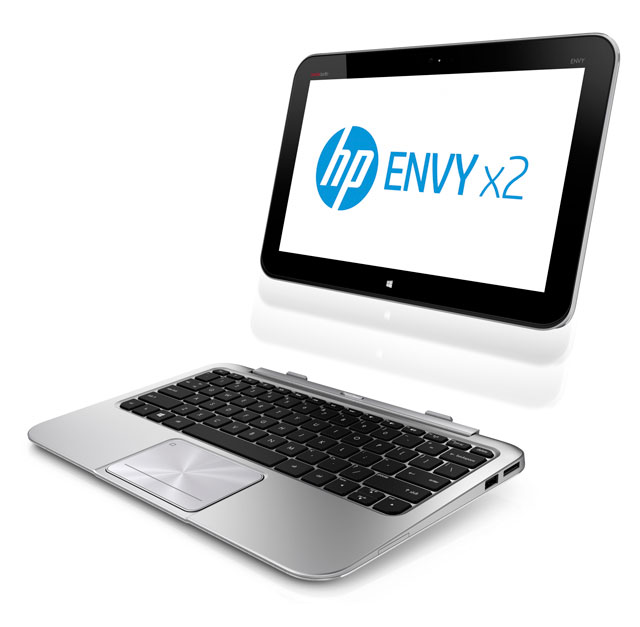
It’s also a form factor that works rather well. Simply flip a switch at the top of the keyboard and the 11,6-inch, 1 366×768-pixel screen pops out, transforming the X2 into tablet computer – and it’s running the full Windows 8, it must be said, not the crippled Windows RT with its lack of applications.

The Envy X2 packs in Intel’s latest Atom system on a chip using the Clover Trail platform and, although the operating system boots quickly — in about 12 or 13 seconds — and moving around Windows 8’s tiles and the file system is snappy, this computer is no match for a machine packing an Intel Core i5 or i7 processor.

Larger apps are slow to load, and performance takes a noticeable hit once you start multitasking properly. This may also be a factor of the paltry 2GB of RAM, which, let’s be honest, is barely enough for the operating system.

The machine is also left wanting in the storage department. Offering only a 64GB solid-state drive, you’re going to run out of space pretty quickly unless you back up constantly to the cloud.

The hardware itself, however, is gorgeous. It’s clear that HP has taken design cues, especially for the keyboard section of the machine, from Apple’s 11,6-inch MacBook Air. The machine tapers beautifully to its front edge and looks the part with its high-quality silvery plastic. The keyboard, too, is top notch, offering a comfortable typing experience. The keys are well spaced and sized. We’d have liked to have seen a slightly larger trackpad, although it could be argued it’s not necessary given the touch-screen monitor.

The ports are also well positioned, with a full-sized HDMI port on the left, next to a USB 2.0 slot and a 3,5mm audio jack. On the right is the power port (there’s also one at the base of the screen) and another USB 2.0 port. It’s a pity the HP doesn’t offer at least one USB 3.0 port — copying large files across the older technology can be painfully slow.

Removing the screen — to turn it into a tablet — is as simply as flicking a switch. And returning it to its dock is dead easy, too. It clips into place neatly and firmly, giving you the confidence it’s not going to fall out if you flip the machine over at an angle.

Because the screen/tablet contains most of the electronics in the Envy X2, it is fairly easy for the whole unit to tilt over backwards, especially when it’s being used on your lap. This is easily overcome by simply resting a hand (or both hands) on the keyboard section. For desktop use, this isn’t an issue.

Because it doubles as a tablet, the Envy X2 comes with a rear-facing camera — at 8-megapixels it shoots reasonably good-quality images, although it’s unlikely you’re going to be using this thing, instead of your smartphone, to shoot pictures. The front-facing camera is a low-resolution VGA model for basic video calling.

The touch screen is certainly no match for the “Retina” display on Apple’s new iPad, but it’s reasonable enough, especially when it’s in docked mode.

Annoyingly, however, there’s noticeable flicker on the screen at times, especially in slightly darker environments. It’s not a deal-breaker, but be aware of it when weighing up your options.

In terms of battery life, the HP is a winner — expect to get at least seven hours of constant work out of the machine in docked mode and between five and six hours from the undocked tablet. Some of the kudos must surely go to the 1,8GHz Clover Trail-based Atom processor.

The speakers, located at the bottom left and right of the screen/tablet, are tinny and underpowered. But the integrated Beats Audio technology is great, provided you plug in headphones.

Conclusion
The HP Envy X2 and machines like it show where the Windows-based PC industry is headed in the next few years. But these hybrid machines still lack the grunt necessary to make them real workhorses. If all you need the machine for is basic Web browsing, e-mail and document editing, then this computer is worth considering, especially since it offers the full Windows 8 experience, meaning it will run crucial business applications.

If it’s an everyday workhorse you need, then it’s still best to choose a machine with more RAM and powered by a Core i5 or Core i7 processor and then to purchase a tablet computer separately.  — (c) 2013 NewsCentral Media

  • The HP Envy X2 has a recommended retail price of R10 999

Share this article

  • Greg Mahlknecht

    I got an Acer Iconia W510 recently – Acer’s equivalent of the Envy X2, and am very impressed. A few things to add to the review:

    - The Clover Trail Atom SoC inside these tablets is every bit as efficient as ARM SoC’s; the Iconia W510 tablet gets 8 hours, and 16 when docked to its keyboard.

    - The W510 has more battery in the keyboard base, and therefore works better as a little laptop – it never feels like it wants to fall over. In addition to this, you can bend the keyboard the “wrong” way so that it’s facing down, which turns it into nice stand for the tablet. In this configuration, obviously the keyboard isn’t active, and there are subtle bumpers in the correct places to stop the keys scraping on the desk.

    - While it’s true it’s a bit of a dog running “real” desktop applications, bear in mind there is absolutely no penalty on the touchscreen experience – apart from costing a bit more, there’s nothing you’ve compromised compared to an RT tablet. I wonder if there’s even a reason for the ARM-based RT tablet to exist, because they’re not particularly cheap. Even medium-weight applications run okay – Google Earth, for example, runs extremely smoothly. XBMC also ran like a champ, streaming 720p over wifi without issues, which makes this an amazing media center tablet.

    - Something I haven’t seen enough said about with Win8 tablets is the multi-user aspect. You can set up a user for each of your family, and they can have totally different apps, colours, etc each existing in their private part of memory. All users can share one marketplace account if they want. In addition to this, you can enable “family safety” for kids, whereby it’ll restrict the sites they go to with a nanny filter, and each week send a report to the main account with usage, top sites visited, apps used & installed, etc.

    - Another general Win8 comment: There’s been far too much written about the failure Windows 8 is on desktops, and how it’s seemingly going to be responsible for an apocalypse in the near future. Once you take the 5 minutes to realise the new launcher is superior to the old Start menu (you should have been pinning your apps for years!), the desktop experience is great – the desktop UI is aware of fat fingers, and you tend to hit even small buttons/switches very easily. Touch-and-drag works in most apps (it made whizzing around in the aforementioned Google Earth superior to any mouse/touchpad experience), and pinch-to-zoom works in apps that have been made aware of it – it’s clear that touchscreens are here to stay in laptops, and probably desktops, and I welcome that – they make an incredibly efficient 3rd input method, that works well alongside your keyboard and mouse/touchpad.

Why TechCentral?

We know that as a prospective advertiser, you are spoilt for choice. Our job is to demonstrate why TechCentral delivers the best return for your advertising spend.

TechCentral is South Africa’s online technology news leader. We don’t say that lightly. We believe we produce the country’s best and most insightful online tech news aimed at industry professionals and those interested in the fast-changing world of technology.

We provide news, reviews and comment, without fear or favour, that is of direct relevance to our fast-expanding audience. Proportionately, we provide the largest local audience of all technology-focused online publishers.

We do not constantly regurgitate press releases to draw in search engine traffic — we believe websites that do so are doing their readers and advertisers a disservice. Nor do we sell “editorial features”, offer advertising “press offices” or rely on online bulletin-board forums of questionable value to advertisers to bolster our traffic.

TechCentral, which is edited and written by award-winning South African journalists, cares about delivering top-quality content to draw in the business and consumer readers that are of most interest to technology advertisers.

We’d like the opportunity to demonstrate the value of directing a portion of your advertising budget to TechCentral, whether your company is in the technology field or not. Numerous opportunities exist for companies interested in reaching our audience of key decision-makers in South Africa’s dynamic information and communications technology sector. We offer packages that will deliver among the best returns on investment available in the online technology news space.

For more information about advertising opportunities, and how your organisation can benefit by publicising itself on TechCentral, please call us on 011-792-0449 during office hours. Or send us an e-mail and ask for our latest rate card and brochure.