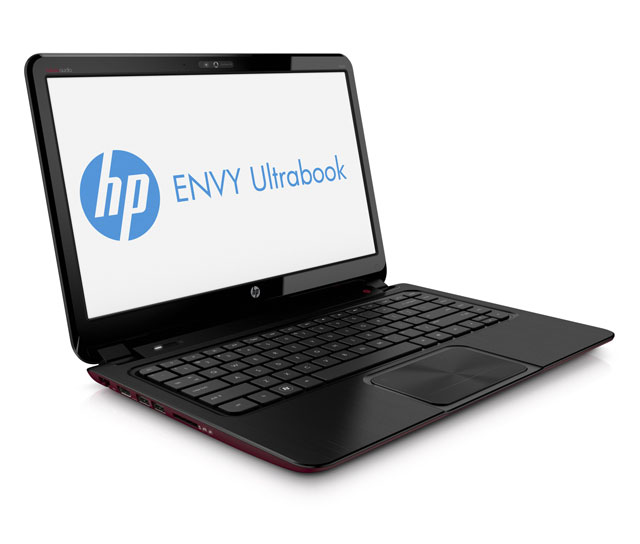
The Envy 6 is the latest in Hewlett-Packard’s range of laptops aimed at style-conscious consumers. It’s definitely good looking, but beneath its pretty skin it’s lacking in performance and feels somewhat cheaper than it should considering prices start at R10 999.
HP has been hard at work in recent years trying to shake its reputation as a maker of dull but functional machines for companies.
It’s partnered with the likes of Beats, the audio company, and released a range of ultraportable laptops that hope to capture the attention of the consumers that value the look of their device as much as what it can do.
HP has released two very similar Envy 6 models, one powered by an Intel Core i5 1,7GHz processor and the other with an AMD CPU. The Intel-powered model we reviewed is therefore dubbed an “Ultrabook” (Intel’s trademark), while the AMD model is the “Sleekbook”.
On first boot, the Envy 6 takes you through the setup process that includes encouraging you to register the device and prompting you to set up a 60-day trial of Norton Internet Security.
Aside from the Norton tie-in, voice and video chat service Skype is preinstalled and a shortcut that encourages users to purchase Microsoft Office 2010, the Envy is refreshingly free of “bloatware” — the reams software manufacturers often preload on new machines because of partnerships or subsidies.
Since it first appeared three years ago, the Envy range has been positioned as HP’s premium range of laptops. With the Envy 6, HP appears to be going after a wider audience than the product’s predecessors, which explains the 1 366×768 resolution — rather than the 1 440×900 one would expect in a 15,6-inch display — and the absence of a Core i7 option.
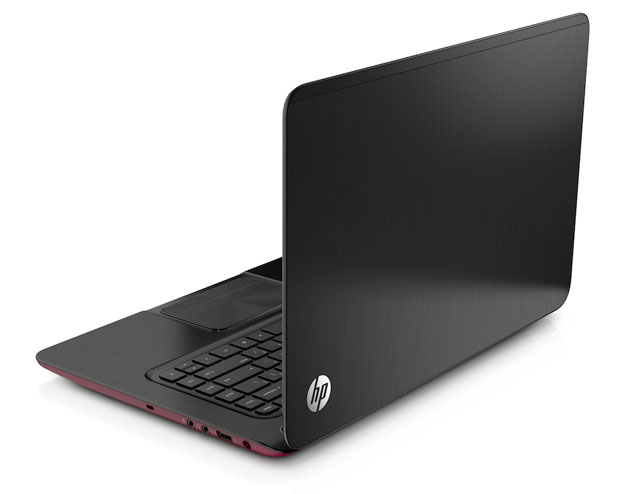
It also might explain some of the corners that have been cut, such as the lack of backlighting for the keyboard and an uninspiring trackpad. The whole trackpad is clickable, making the left and right click buttons seem a little superfluous, particularly as the trackpad also supports Apple-style two-finger taps for right clicking and two-finger dragging to scoll, out of the box.
A pair of USB 3 ports, a card reader and an HDMI and Ethernet port are located on the left-hand side of the laptop, with a single USB 2, audio in/out jacks and the power port located on the right. Two speakers complete with a Beats logo, sit above the keyboard and, although the speakers are uninspiring, plug in a set of high-end headphones and the sound is excellent.
There’s no VGA output, but with the HDMI port this isn’t really a problem. There’s also no optical drive, but that’s to be expected on an ultraportable and unlikely to be missed by many. The inclusion of two USB 3 ports is welcome, but the absence of a high-speed solid-state drive (SSD) is disappointing.
Despite the screen resolution looking a little dated, particularly in a larger-than-standard screen, the inclusion of a Radeon GFX unit means the Envy 6 can handle most graphics intensive activities comfortably. It may not run the latest games with all settings on maximum, but it should run them with only a handful of concessions.
The Envy 6 comes with Windows 7 Home Premium, a move that’s to be expected given its target market. It also includes an HD webcam above the display, which is in keeping with the inclusion of Skype on the desktop and makes a pleasant change from the 640×480 cameras so often seen in laptops.
For those who use their laptops for browsing, e-mail and a little media consumption, the HP Envy 6 is a great looking device that will tick all of the necessary boxes. If you’re looking for a bit more without breaking the bank you might want to consider doubling the RAM to 8GB.
The laptop’s a little heavy at 1,93kg, but that’s the price you pay for extra screen real estate and a decent battery. Depending what you’re doing with it, the Envy 6 should last four to six hours, which is in keeping with other devices in its class.
Clearly, HP wants the Envy 6 to look like more of a high-end device than it actually is and this isn’t necessarily a bad thing. If you’re looking for a truly top-end device, the price of the Envy 6 will tell you that it isn’t. If you want a mid-range device that can handle most of what the average user wants to throw at a laptop, it’s not a poor choice at all. — (c) 2012 NewsCentral Media