Griffin’s pretty pointless pebble

Griffin’s universal remote for iOS looks great, but its limited support for devices and the inability to add custom ones limits its usefulness, particularly in SA. By Craig Wilson.

Remote controls have remained as convoluted and cluttered as ever, despite advances in technology. So, it makes perfect sense that accessories maker Griffin combines the simplicity of the smartphone into a universal remote control.

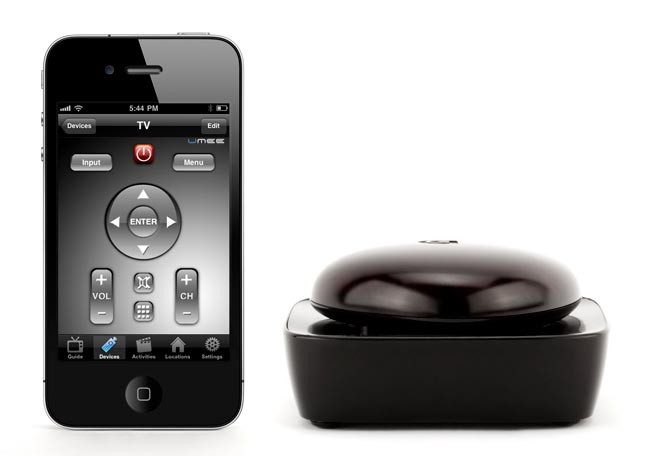
The company’s solution is a remote control system for iPhones and iPads it calls Beacon. Pebble-shaped and pretty, Griffin claims the Beacon connects to more than 200 000 devices that use infrared. It connects to an iPhone or iPad via Bluetooth in lieu of the remote, turning your Apple device into a remote control.

The Beacon for iOS works with every iPod touch from the second generation onwards, the iPhone 3G or later, and any iPad. Pairing is as simple as pushing the pebble-like protrusion on the top of the Beacon and looking for it under the available devices list on the Bluetooth menu in iOS.

Thereafter, users are prompted to download an application from the iTunes App Store called Dijit. This contains the data for the more than myriad devices Griffin says the Beacon supports.

We had no problem using Dijit to pair the Beacon with a fairly old LG Electronics LCD TV. Dijit prompted us to add a TV and the process was as simple as selecting LG from a list of brands. The app then presented a power button and asked us to check if pressing it turned the TV on or off. If not, it would offer another remote option as it worked through its options.

On the third try we struck gold. The pared-down on-screen remote is a treat and includes buttons for power, volume, channel up and down, input devices and menu access.

But that’s where we came unstuck. Trying to add a DStv personal video recorder decoder proved unsuccessful, despite Dijit having a DStv option in its list of menus. It simply didn’t work, and this is where the failings of the Beacon come to light. Unfortunately, there’s no way to use an existing remote control to programme Dijit to recognise a device for which it doesn’t already include information.

If your device isn’t on Dijit’s list, it’s simply not going to work with the Beacon. Although it may have been more complicated to allow users to create custom remote controls, the fact that there isn’t the option to do so greatly limits its usefulness.

We also couldn’t find remotes for a TopTV decoder, a Mede8er digital media player, a Samsung dual-dock or an iHome AirPlay speaker. In other words, it’s great for your TV and DVD or Blu-ray player, but it might not be much use with anything else.

The unit is supplied with four AA batteries and loses further marks for its lack of a mains option. Without rechargeable batteries, the unit could prove costly to run with many reports suggesting that Griffin’s claims of eight weeks of life on a set of batteries are substantially overstating real-world performance.

Griffin also makes a version of the Beacon for Android devices, but as it uses the same Dijit application it seems unlikely that version has sidestepped any of the problems that plague the iOS unit.

It’s a great concept, but the inability to expand the range of supported devices means the boast about it supporting more than 200 000 devices on the side of the box just leaves a bad taste in the mouth. It does look very nice, though.  – (c) 2012 NewsCentral Media

  • The Griffin Beacon has a recommended retail price of R699

Share this article

  • Ebendl

    Wait, I have one of these (been a while since I used it though) and I could program custom functions?

    I had a remote control for my Xtreamer media player which didn’t exist on the built in library and programmed it without problems! I just tested it on IOS and the function is still there.

    You can add a device in Dijit (choose “I don’t see my brand listed here” ) and then pick the type of device you want to control (Blu-ray, CD, Cable, etc.). Then, at the device screen, tap “Edit” and you can move the buttons around. If you tap a button you get these options:

    “Add/Delete/Move Buttons”
    “Edit Button Properties”
    “Set up a new button”
    “Learn Existing Buttons”.
    etc.

    You then point the remote at the back of the Beacon where the sensor is and learn the function.

    Did you guys perhaps test a different version of the Beacon or the software?

    Must admit, the battery life isn’t too great, that’s why I stopped using it.

  • Greg Mahlknecht

    The simple fact is that phones make bad remotes. You need something tactile, tough, with a long battery life. I’ve been fiddling around with these things since the old iPaq PDA days, and the best touchscreen remote I’ve ever had was a Philips Pronto. But that’s because it had some tactile buttons for common tasks, it was tough and batteries lasted for weeks. Right now, I’ve got a Logitech Harmony. Hard to beat.

  • GregRickson

    I have a Logitech Harmony 1 – Which is a GREAT universal remote. These day few UNIVERSAL remote do South Africa’s DSTV but the Harmony 1 does !! It is also FUTURE proof. Buy a new Device simply find it on their website and Add it to the remote. I think they even keep a backup of your “profile” on their website !!

  • tashreeq

    Hi ebendl so you saying that this will work on my xtreamer pro,and all i need is an ipod and a beacon.why im asking because my remote is broken

Why TechCentral?

We know that as a prospective advertiser, you are spoilt for choice. Our job is to demonstrate why TechCentral delivers the best return for your advertising spend.

TechCentral is South Africa’s online technology news leader. We don’t say that lightly. We believe we produce the country’s best and most insightful online tech news aimed at industry professionals and those interested in the fast-changing world of technology.

We provide news, reviews and comment, without fear or favour, that is of direct relevance to our fast-expanding audience. Proportionately, we provide the largest local audience of all technology-focused online publishers.

We do not constantly regurgitate press releases to draw in search engine traffic — we believe websites that do so are doing their readers and advertisers a disservice. Nor do we sell “editorial features”, offer advertising “press offices” or rely on online bulletin-board forums of questionable value to advertisers to bolster our traffic.

TechCentral, which is edited and written by award-winning South African journalists, cares about delivering top-quality content to draw in the business and consumer readers that are of most interest to technology advertisers.

We’d like the opportunity to demonstrate the value of directing a portion of your advertising budget to TechCentral, whether your company is in the technology field or not. Numerous opportunities exist for companies interested in reaching our audience of key decision-makers in South Africa’s dynamic information and communications technology sector. We offer packages that will deliver among the best returns on investment available in the online technology news space.

For more information about advertising opportunities, and how your organisation can benefit by publicising itself on TechCentral, please call us on 011-792-0449 during office hours. Or send us an e-mail and ask for our latest rate card and brochure.