Much like Microsoft with its forthcoming Surface tablet computers for Windows 8 and Windows RT, Google has decided that if you want something done right you’re probably better off doing it yourself.
The company announced earlier this year it was entering the tablet fray with a 7-inch offering called the Nexus 7. The result? Arguably the best tablet in that particular form factor that money can buy.
The Asus-made Google Nexus is the first device we’ve used that runs the latest version of Google’s Android operating system (OS), called Jelly Bean. That’s one of the best reasons to get any Nexus device: they come with the latest version of Android Google has to offer, and they’re usually the first devices to get updates.
Just as the Samsung-made Galaxy Nexus gave us our first look at Android 4.0, better known as Ice Cream Sandwich, the Nexus 7 shows off some of the best of what vanilla Jelly Bean has to offer.
Jelly Bean is the operating system Android fans have longed for. It’s good looking, responsive, devoid of superfluous settings and animations and, best of all, it’s extremely intuitive to use.
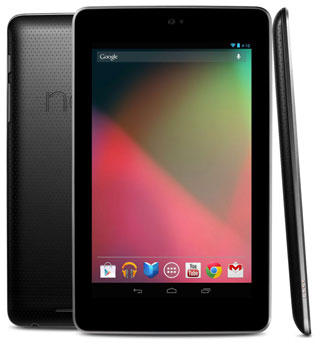
By default, it includes a folder with shortcuts to Google products such as Gmail, Maps, Earth, Talk, Currents, Calendar and contacts — called People — and access to the Nexus’s image gallery.
The Nexus 7 is one of the most responsive tablets to make its way to TechCentral’s offices in recent months. Powered by a quad-core Tegra 3 processor and 1GB of RAM, the tablet offers more get-up-and-go than even Samsung’s recent Galaxy Tab 10.1 2, never mind the 7-inch Galaxy Tab.
Its sheer processing potency is one of the two things that make the Nexus such a superb device. The other is its display, which has a 1 200×800-pixel screen — the same resolution as most 10-inch tablets. It has respectable 216 pixels per inch, more than the iPad 2 and not bad when compared to the new iPad’s 264ppi.
Regardless of what you intend to do with a tablet, how speedily it responses to instructions and open applications and how easy the display is on the eyes are the two most important features. It’s why the new iPad will still outsell even the best Android equivalents, even though Apple’s iOS is beginning to pale when compared to the flexibility offered by Android. It’s also why the Nexus 7 should fly off the shelves.
The Nexus 7 probably wasn’t conceived as a competitor to the iPad, but rather as an attempt to quash Amazon.com’s Kindle Fire tablet with its bastardised take on Android. At US$199 for the 8GB version and $249 for the 16GB version, the cheapest Nexus is the same price as the most expensive Fire and is far superior.
Yet the screen resolution is so good on the Nexus that it feels like it could be considered as a genuine alternative to larger-screened competitors, assuming typing with both hands isn’t something you intend doing often. If it is, a 10-inch tablet is essential. However, if you’re looking to send the odd e-mail or browse the odd Web page, with most of your time spent consuming text, images or video, it’s a great option at less than half the price.
The lack of internal storage could prove problematic for some users, particularly as there’s no option to expand it via microSD, and the lack of a Sim-card slot means streaming media is limited to Wi-Fi. But if being online on the run is important, most smartphones now offer hotspot capabilities, meaning you can tether the tablet to your handset.
There’s also no HDMI-out option on the Nexus, but again for most people this won’t be a problem. We’ve never used tablets to push video to anything else, but some people might miss it, especially for images. However, as there’s no rear facing camera — only a 1,2-megapixel front-facing shooter for video calling — any images or video you wish to watch on it will almost certainly be manually put onto the device rather than created with it anyway.
One of the anomalies about the Nexus 7 is its preference for portrait rather than landscape orientation when it comes to basic operation. Like many handsets, the home screens and menus can’t be viewed in landscape orientation, but most applications can be, including those that require typing. We found the landscape keyboard a little too small for full-on touch typing and so we spent most of our time typing with thumbs in portrait-mode instead — a comfortable and speedy experience.
Being a Google device in every sense, it’s not surprising that there’s a search bar at the top of all five home pages, which includes the option to search using voice. It also means the default browser is the excellent Chrome for mobile devices.
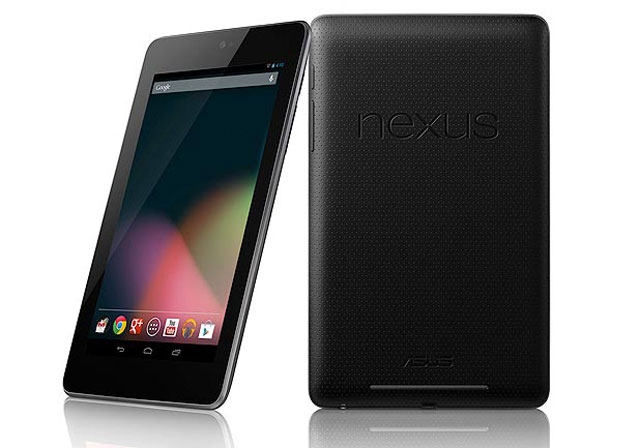
The only physical buttons on the Nexus 7 are the power button and the volume rocker, both on the right hand side. The only ports are the micro-USB port for charging and data transfer and a 3,5mm audio jack, both located on the bottom of the device. Aside from the embossed Nexus and Asus logos, the slightly rubberised rear contains a single, thin speaker, two-thirds the width of the device.
Weighing only 340g, the Nexus 7 feels every bit the premium device, even though it’s not priced as one. In fact, it’s diminutive price is fairly astounding when one considers it includes almost all of the bells and whistles you’d expect from a far more costly tablet, including Bluetooth, near-field communication technology, a gyroscope, accelerometer and even a GPS.
Because there’s no option of a 3G version, the Nexus 7 manages to sidestep another affliction common to 7-inch tablets — poor battery life. Its 4 325mAh battery offers around eight hours of intensive use. It’s not quite the 10 hours you can eke out of an iPad or Galaxy Tab 10.1, but that’s hardly an issue.
All told, Nexus 7 is a wholly impressive device. We’d have loved to see a more expensive model with a 3G option, but there’s very little reason not to recommend it. It’s possibly the best 7-incher there is, and at a great price. We’re rather sad that we’ll have to give our review unit back.
Although it’s not sold in SA yet, the Nexus 7 can be imported from WantItAll, which supplied our review unit. WantItAll charges R3 370 for the 8GB version and R3 756 for the 16GB model. — (c) 2012 NewsCentral Media