The basic concept of the computer mouse has barely changed in the past 30 years.
Sure, they’ve become wireless, and they use lasers instead of dust-loving trackballs, but the basic concept hasn’t changed in all that time.
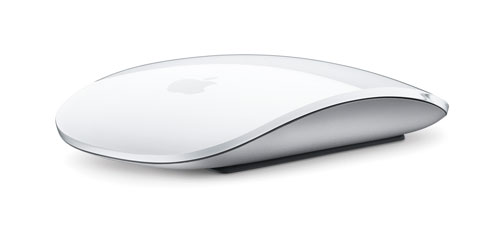
Apple’s new Bluetooth-based Magic Mouse (recommended retail price: R849) doesn’t reinvent the humble computer mouse either. But it is, by far, the best mouse I’ve used.
Here’s why.
First of all, Apple has applied its legendary design touch to this mouse — its deceptively simple curved lines, low profile and buttonless appearance have turned what is ordinarily a dull computer accessory into something you actually find yourself staring at. Seriously.
But it’s not the design that makes this mouse the best mouse on the market. That accolade goes to the Magic Mouse’s multi-touch interface borrowed from the trackpad on Apple’s MacBook computers.
The multi-touch area covers the top of the mouse and allows you to scroll up and down and left and right with a simple swipe of your index finger. It works almost like magic — you have to try it yourself.
Then there’s the dual-finger swipe that allows you to flip backwards and forwards through Web pages, for example. This didn’t work quite as well as I expected and may require a little practise.
Apple, famous for its one-button computer mice, has even introduced the option of a right-click — enabled via software. Click on the front, right-hand-side of the mouse, like you would on a two-button mouse, and that’s the equivalent of a right-click. Nifty.
The only downside of the Magic Mouse is the one feature that it lacks. Unlike the Mighty Mouse, the Magic’s predecessor, you can’t simply squeeze the mouse in your hand to bring up Exposé to switch quickly between open applications.
The mouse-squeeze feature of the Mighty Mouse is killer and has saved me hours of lost productivity over the years. If the Magic Mouse had included this function, I’d have called it the perfect mouse. It’s still the best mouse I’ve used. But it could have been even better. — Duncan McLeod, TechCentral